Chat velocity
The clearest view of how busy chat was, minute by minute.
The Chat Velocity tab shows a line chart of messages per time window across the whole stream, plus a grid beneath it with the underlying numbers.
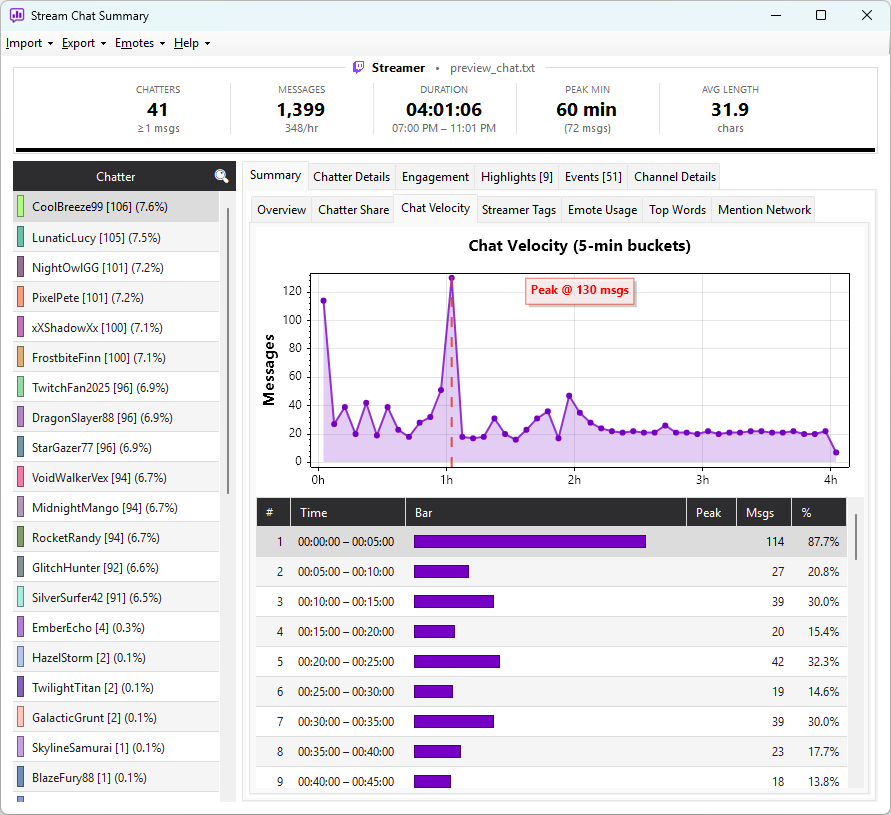
What you see
| Column | Meaning |
|---|---|
| Bucket | Time range (e.g. 0:00 – 0:05) |
| Messages | Total messages in that window |
| Rate | Messages per minute |
The default window size is 5 minutes. Highlights show up as visible peaks on the line — the Highlights tab gives you the same peaks ranked and annotated.
Reading the chart
- A flat line — steady conversation throughout
- One tall spike — a single hype moment (a clutch play, a big sub bomb)
- A rising slope — chat building over the course of the stream
- A drop in the middle — likely a break, a quiet game segment, or a tech issue
Hover any point on the line to see the exact message count and time.