Engagement tiers
Every chatter is automatically assigned to one of four tiers based on how much of the stream they showed up for. Tiers appear in the Summary grid, in the chatter filter dropdown, and in the Engagement sub-tab of Chatter Details.
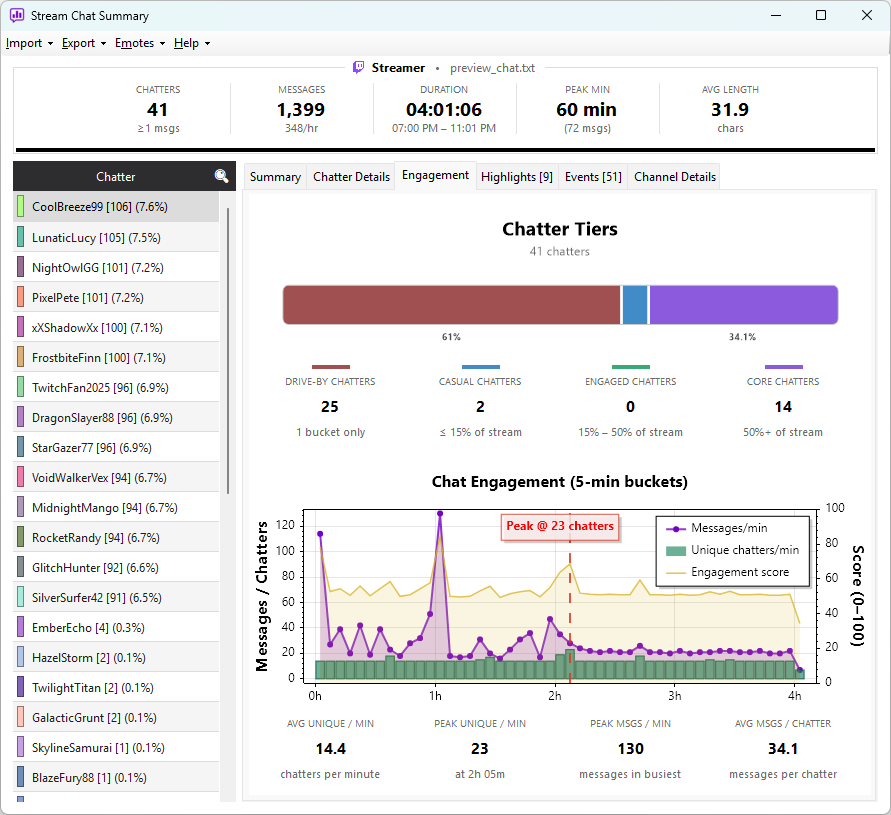
The four tiers
The classifier doesn't care how many messages someone sent — it cares how many distinct time windows they were active in. The stream is divided into 5-minute buckets, and a chatter's tier depends on what fraction of those buckets they appeared in.
| Tier | Buckets active | Meaning |
|---|---|---|
| Drive-By | exactly 1 | Said something once and left — a one-time visitor |
| Casual | more than 1, less than 15% | Popped in and out, but not consistently |
| Engaged | 15% to 50% | A regular participant for a meaningful chunk of the stream |
| Core | 50% or more | Present for at least half the stream — your loyal audience |
Why presence-based, not message count
A chatter who sends 200 messages in one 10-minute burst then disappears is not as engaged as someone who sends 30 messages spread across a four-hour broadcast. The presence-based approach correctly classifies the first as Casual and the second as Engaged.
It also self-adjusts to stream length. The thresholds are exact proportions of the total bucket count — 15% separates Casual from Engaged, 50% separates Engaged from Core — so the bucket maths scales with the stream:
- A 4-hour stream has 48 five-minute buckets
- Casual: active in fewer than 7.2 buckets (so 2–7)
- Engaged: active in 7.2 to under 24 buckets (so 8–23)
- Core: active in 24+ buckets
- A 30-minute stream has 6 buckets
- Casual: fewer than 0.9 buckets (rounds with the Drive-By boundary at 1)
- Engaged: 1 to under 3 buckets (so 1–2)
- Core: 3+ buckets
You don't need to tune any thresholds — they adapt automatically.
Where tiers appear
- Summary tab grid — every chatter row has a tier tag next to their name
- Tier filter dropdown — above the chatter list, filter to one tier (e.g. show only Core chatters)
- Engagement sub-tab — in Chatter Details, a distribution chart shows where the selected chatter(s) sit relative to everyone else
Using tiers in practice
Engaged is often where growth comes from — present enough to be invested but not yet daily regulars. Their feedback on a new format or schedule change tends to be more useful than Core (who'll show up regardless) or Drive-By (who won't be back).
Filter the chatter list to Core, select all, and look at the Top Words and Activity Chart — these are the people whose taste and vocabulary define your community.