Overview stats
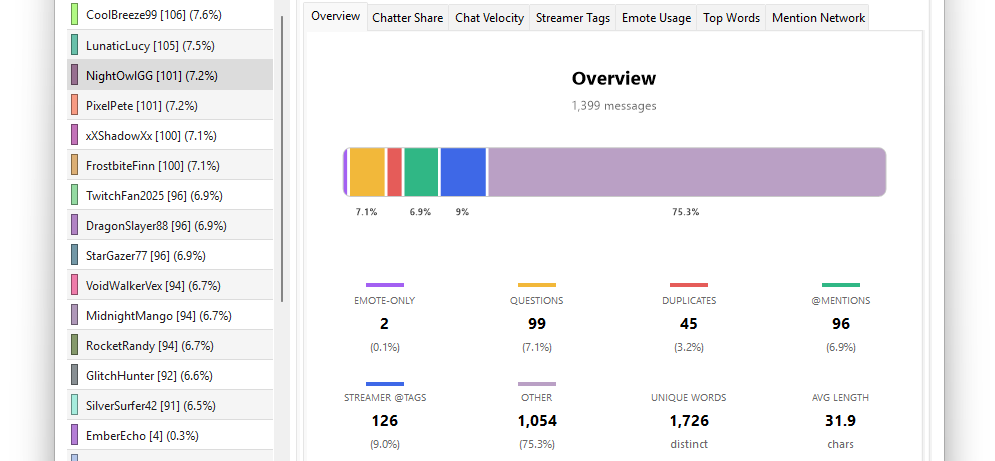
The Overview tab on the right side of the main window summarises the whole chat as a set of counts and percentages. It's the first thing you should read after an import — every other tab drills into one slice of what's here.
The category breakdown
Inside the Overview tab you'll see a list of message categories. Each shows a count and a percentage of the total.
| Category | Definition |
|---|---|
| Messages | Total (same as the header) |
| Emote-Only | Every word in the message was a known emote code |
| Duplicates | Fuzzy-matched repeats of an earlier message |
| Questions | Contains a ? somewhere |
| Mentions | Contains any @username |
| Streamer Tags | Contains @streamer_name specifically (a subset of Mentions) |
| Commands | First word starts with ! followed by a letter (e.g. !clip) |
| Other | Everything that didn't match any of the above |
See Message categories for the exact rules used to classify each.
Headline stats
Below the category breakdown, three more numbers:
- Unique Words — distinct word tokens across the whole log, with common stopwords like "the", "a", "is" filtered out. A rough proxy for vocabulary diversity.
- Most Tagged User — the username that got
@mentionedthe most, with their tag count. The streamer themselves and the user's own self-mentions are excluded. - Top Chatter — the username with the highest single message count.
What these numbers tell you
A few quick reads:
- High Emote-Only % — chat was hype rather than conversational. Common on action streams, FGC, sports.
- High Duplicate % — lots of copypasta or spam waves. Look at the Duplicates list to find the meme of the night.
- High Question % — Q&A streams, "just chatting" formats, or new viewers asking about the game.
- High Streamer Tag % — directly engaged audience asking the streamer things specifically.
- High Command % — heavy bot use (giveaways, song requests,
!sochains).
There's no "right" mix — these are diagnostic shapes that help you understand what kind of stream this was.